
An aesthetic clinic sells a medical treatment and an experience at the same time. Its software has to keep a clinical record a physician is willing to sign, and run the front desk, checkout and follow-up around it. Here is what that takes for cosmetic, skin and physician-led practices, and how Klinycs does it.
What is aesthetic clinic software?
Aesthetic clinic software is a practice management system for clinics that offer cosmetic and skin treatments. It keeps the clinical record, from chart notes to consents and photos, and runs the business around it: booking, treatment plans, checkout, stock, team and reports.
It goes by several names: aesthetic clinic management system, aesthetic practice management software, medical aesthetics software, cosmetic clinic software or skin clinic software. The names overlap. What separates products is how deep the clinical side goes: whether the chart understands injections, devices and treatment series, or treats every visit as a text box.
If your clinic runs mostly on injectables and memberships, our page on med spa software goes deeper on that model.
Which practices is aesthetic clinic software for?
It is for any clinic where a treatment needs both a chart and a checkout: aesthetic, cosmetic and skin clinics, and physician-led practices that offer aesthetic treatments. Each type leans on a different part of the system.
| Practice | What the software has to handle | How Klinycs handles it |
|---|---|---|
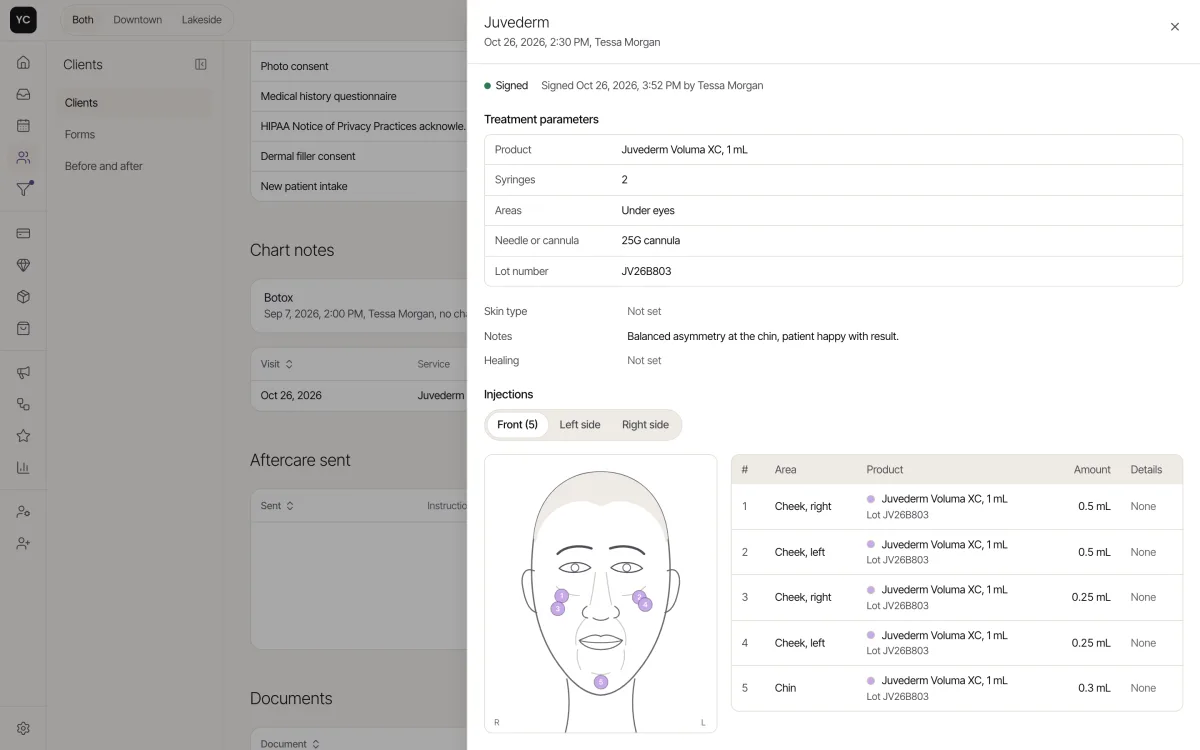
| Cosmetic injectables | Units and lot per injection point, and return visits on time | A face map with product, units and lot per point, and cadences per service |
| Skin and laser | Treatment series, device settings and progress across sessions | Packages with sessions left, device settings in the note and photos compared with a slider |
| Hormones, IV and wellness | Intake before the first visit, recurring therapy and vials by lot | HRT and weight loss SOAP templates, intake sent at booking, every vial and bag tracked by lot |
| Physician-led practices | Several providers, clear roles and a record of who wrote what, and when | 8 roles, sign and lock with amendments, an audit log, and lab orders and secure fax on Enterprise |
| Several locations | One brand with separate rooms, stock and teams | A location switcher on every screen, with rooms, providers and stock by location |
See how Klinycs works for skin and laser clinics and for hormone and IV therapy clinics.
What should an aesthetic clinic management system include?
It should include a clinical side and a business side that share one client record. If either half lives in another tool, the record splits, and the chart, the stock and the bill stop agreeing.
The clinical side
- Chart templates by treatment. Klinycs has 13 chart templates, with SOAP notes or free text and fields for dilution, needle, numbing and device settings.
- Sign and lock. A signed note changes only by amendment, with a reason, and every version is kept.
- Consents that keep their version. Forms go out automatically for each service, and a signed form keeps the version the client saw.
- Photos at matching angles. The camera shows the last photo of the same area as a ghost overlay, and consent to market decides what can be shared.
- An AI Scribe the provider reviews. It listens to the visit and drafts the SOAP note, the provider reviews and signs, and everything it wrote is marked as written by it.
The full workflow is on the charting page.
The business side
- Treatment plans and quotes. A plan goes out as a branded link the client accepts by typing her name, with a Book button on every planned treatment.
- Packages and memberships. Packages track the sessions left and remind the client before they expire. Memberships carry monthly credit and member prices.
- Inventory by lot. Signing the chart takes units out of stock by lot, and Usage shows what each treatment really costs and earns.
- Team and commissions. A weekly time clock, commissions with tiers, tips and bonuses, and a payroll export.
- Reports. Revenue, including what is already booked ahead, retention at 90, 180 and 365 days and lifetime value, always against the previous period.
How does Klinycs work for physician-led practices?
Enterprise is the Klinycs plan made for medical practices and groups. It removes the limits on locations and providers and adds lab orders and secure fax through certified partners, AI insights, migration from your current system and priority support. e-Prescribing is coming soon as an add-on.
Inside the practice, eight roles with a permissions matrix control what each person sees, each provider sees only their own Instagram DMs, and the audit log records every record view, change, export and sign-in. From Clinic up, video visits keep the chart beside the call.
The line on AI is plain: only the AI Scribe and AI insights are AI. Reminders, cadences, segments and lead scores run on rules your clinic sets.
Which Klinycs plan fits an aesthetic clinic?
Clinic, at $399 per clinic per month, is the plan made for a medical aesthetics clinic: SOAP charting with the face map, lot-tracked inventory, memberships, automations and hosting under a signed BAA all start there.
Studio, at $99, fits a studio on the rise, with one location, up to 3 providers with a calendar and simple charting. Enterprise, at $1,199, covers medical practices and groups with unlimited locations and providers. Every plan comes with an unlimited team, because Klinycs is priced per clinic, not per seat.
If you will store chart notes and health history, choose Clinic or Enterprise, where hosting under a signed BAA is included. Compare every line on the pricing page.
What about HIPAA and the BAA?
There is no official HIPAA certification for software, so be careful with anyone who claims one. What protects a practice is a business associate agreement signed before patient records go in.
On Clinic and Enterprise, Klinycs hosting runs under a signed BAA at every layer before client records move in. Two-step sign-in, the audit log and a full export at any time complete the picture. Details are on the security page.
How do you move a practice to Klinycs?
You move in five steps with both systems running side by side: export, import and check with a duplicate preview, move saved cards between processors, run in parallel, then flip the switch. Full migration is included in Enterprise and done by the Klinycs team: clients, upcoming appointments, packages and balances come over as data, and past chart notes, signed forms and photos come in as documents on each client's record, as far as your current system lets you export them. On Studio and Clinic, you bring your client list in from a spreadsheet. See how switching works.