
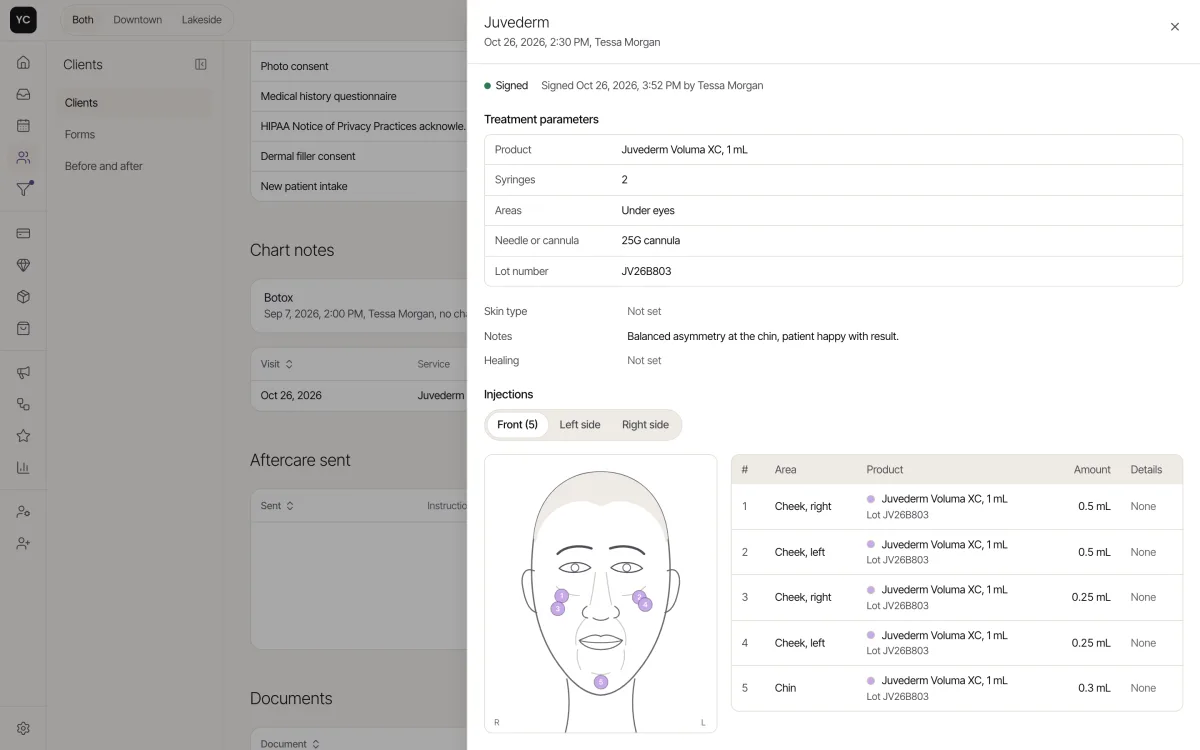
A med spa EMR is the electronic medical record an aesthetics practice uses to chart treatments, keep photos and consents and hold a signed record of every visit. The right one is built around injectables: what was injected, where, how much and from which lot.
What is a med spa EMR?
A med spa EMR, also called an aesthetic EMR, is charting software made for aesthetic treatments such as neurotoxin, filler, skin, laser, weight loss and hormone therapy. It keeps structured treatment fields, photos and signed consents in one record that locks when the provider signs.
A general medical EMR is built around diagnoses, insurance billing and lab results, and rarely has a face map, units and lot at each injection point or a link to product stock. A booking app runs the calendar and takes payments, but its notes are often free text that can be edited after the visit, with no sign and lock and no lot record.
EMR or EHR? An EMR (electronic medical record) is the chart kept inside one practice. An EHR (electronic health record) is built to share a patient's record across practices. Many vendors use the terms interchangeably, and what a med spa needs first is a complete, signed record of its own treatments.
What should a med spa EMR include?
It should include injectable charting on a face map, lot tracking, sign and lock, photos, consents, access controls and a signed BAA. The table shows why each matters and where it lives in Klinycs.
| Requirement | Why it matters | In Klinycs |
|---|---|---|
| Face map charting | The next provider sees what was done and where | Front, left and right views, with product, units and lot per point |
| Treatment fields | Fields can be searched, while free text can only be read | SOAP or free text, with dilution, needle, numbing and device settings |
| Lot and expiration | Find affected clients fast after a recall | A lot on every point, with units deducted by lot on signing |
| Sign and lock | A note that can change quietly cannot be trusted | Changes only by amendment, and every version is kept |
| Photos | Matching angles make progress visible | Ghost overlay of the last photo on the camera |
| Consents | Shows exactly what the client agreed to | Signed forms keep the version the client saw |
| Access and audit | Limit who sees charts and know who opened one | Two-step sign-in, 8 roles and an audit log |
| A signed BAA | Required before a vendor holds a covered practice's health data | Hosting under a signed BAA on Clinic and Enterprise |
How does charting work in Klinycs?
The provider charts on a face map with front, left and right views, and each point records the product, the units and the lot. Notes can be SOAP or free text, with treatment fields such as dilution, needle, numbing and device settings, across 13 chart templates.
Signing locks the note. After that, it changes only by amendment, with a reason, and every version is kept, so the record shows what was written, when and by whom. If your clinic still charts on paper, our free Botox charting template covers the same basics.
How are photos and consents handled?
Both live in the client's record, next to the chart. The camera shows the last photo of the same area as a ghost overlay, so every angle matches, and visits are compared with a slider. Consent to market decides which photos can be shared.
Forms go out automatically for each service, when the visit is booked or before it. Publishing a change creates a new version, and each signed form keeps the version the client saw. Chart notes never show in the client portal.
How does inventory connect to the chart?
Signing the chart note takes the units out of inventory by lot, so the stock count matches what was injected. Inventory tracks lots and expiration dates by location, fills in a purchase order when stock runs low and shows what each treatment costs and earns. See inventory and reports.
What does the AI Scribe do?
The AI Scribe listens to the visit and drafts the SOAP note. The provider reviews it and signs, and everything the AI Scribe wrote is marked as written by it. It comes with Clinic, at 150 notes a month, and with Enterprise on fair use.
How does Klinycs protect client records?
There is no official HIPAA certification for software. What matters is a signed BAA and the safeguards your team uses every day. On Clinic and Enterprise, Klinycs hosting runs under a signed BAA at every layer before client records move in.
Every account has two-step sign-in, with sign-out after inactivity and a sign-in history. The audit log records every record view, change, export and sign-in, 8 roles with a permissions matrix control who sees what, and a full export is available at any time. See security and our guide to HIPAA and med spa software.
How much does a med spa EMR cost?
Pricing models vary. Vendors charge per provider, per user, per location or by tier, and some add fees for setup, data migration, texting or extra modules. Compare the full monthly total for your team, not the starting price.
Klinycs is priced per clinic per month, with an unlimited team on every plan:
- Studio, $99. Simple charting, forms with e-signature and before and after photos, for 1 location and up to 3 providers with a calendar.
- Clinic, $399. SOAP charting with the face map, lot-tracked inventory, the AI Scribe with 150 notes a month, video visits and hosting under a signed BAA, for 2 locations and up to 10 providers with a calendar.
- Enterprise, $1,199. Everything in Clinic, plus the AI Scribe on fair use, AI insights, lab orders and secure fax, migration from your current system and priority support, with unlimited locations and providers. e-Prescribing is coming soon as an add-on.
A practice that needs face map charting, lot tracking or a signed BAA starts on Clinic. Compare every line on pricing.
How do you move records from your current system?
Export your data from the system you use today. We import it with column matching and a duplicate preview, and you check it before anything goes live. Saved cards move to the new processor, and both systems run side by side until you flip the switch. Full migration is included in Enterprise and done by the Klinycs team: clients, upcoming appointments, packages and balances come over as data, and past chart notes, signed forms and photos come in as documents on each client's record, as far as your current system lets you export them. On Studio and Clinic, you bring your client list in from a spreadsheet. See how the switch works.
In the platform